Script References
Overview
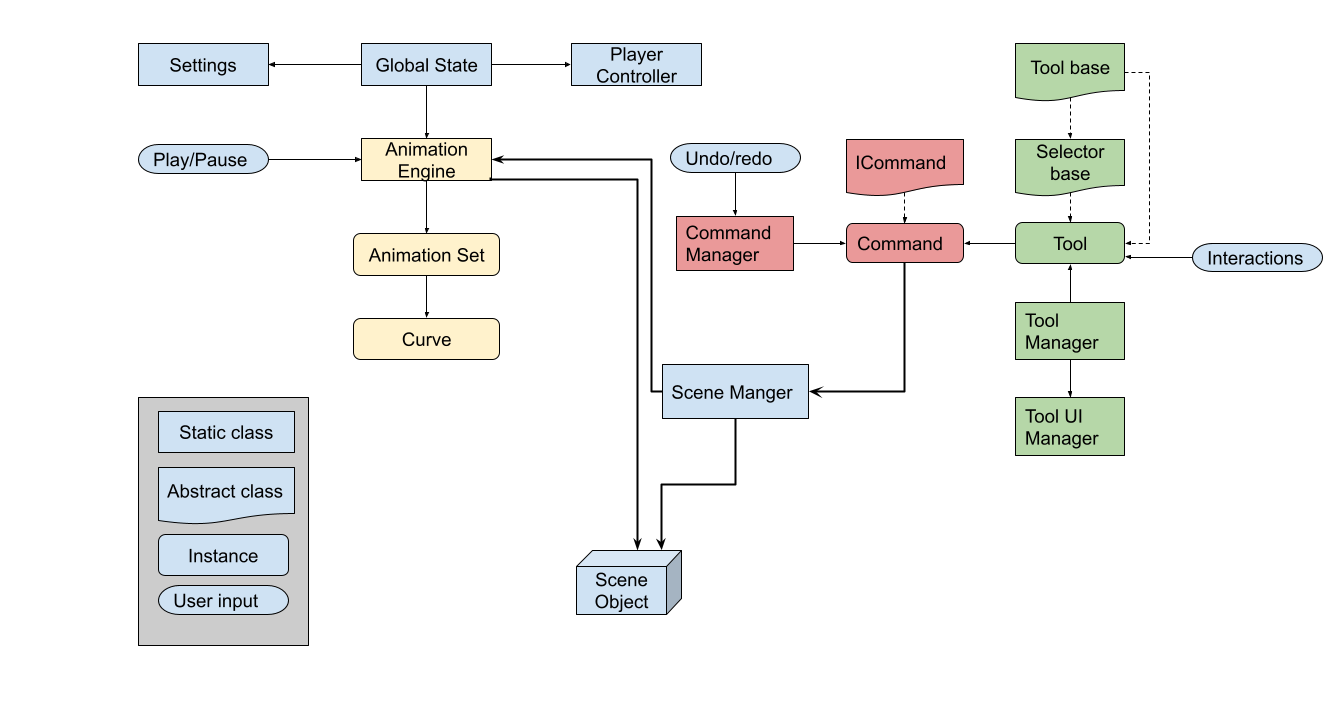
VRtist is centered around three main static classes:
Global State for the core. It contains references for settings, player controllers and animation engine.
Tools Manager for the tools themselves, mostly getting and changing active tools.
Scene Manager which contains many static methods to interact with the content of the scene.
For interaction that could impact various parts of the project, (ie: added objects, selection changes…) UnityEvents are used. Most of these events are in the Global State.
Tools
Tools are managed by two static classes:
Tool Manager for the logic part, referencing all available tools and switching between them.
Tool UI Manager for the User interface part.
All tools inherit from the ToolBase class.
The tool base class registers the tool in the Tool Manager.
The base class also implements methods for interface interaction (slider, buttons…)
Tool base also implements DoUpdate and UpdateUI for tools that need to be manually updated.
Tools that use selection must inherit from SelectorBase instead of ToolBase.
For the interface:
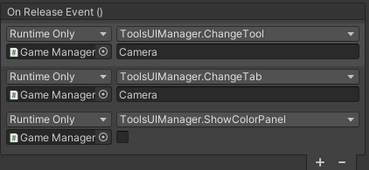
Tool Icons use the UIButton script. They are placed in CameraRig/Pivot/PaletteController/Palette/MainPanel.
They use the OnReleaseEvents to call ToolsUIManager.ChangeTool and ToolsUIManager.ChangeTab with the name of the tool and ToolsUIManager.ShowColorPanel with whether it should show the color picker panel.
The tool panel is placed in CameraRig/Pivot/PaletteController/Palette/MainPanel/ToolsPanelGroup and contains the UIPanel Script.
For the interaction:
The tool script itself is in CameraRig/Pivot/ToolsController/Tools and the object name is the same that is called in ToolsUIManager.ChangeTool
Animation engine
The animation Engine class stores and manages all animations in the scene.
An animation is represented by an animation set.
An animation set contains the transform of the animated object and a dictionary of animatable properties with their curves.
A curve is represented by a list of animation keys (frame, value, interpolation type).
The curve contains a cache of its values for each frame. When the curve is modified (ie: a keyframe is added or removed) the curve will recalculate it’s cache.
When the current frame is changed, the animation engine will evaluate every animated object. To do so, for each animation set, it will read the value cached in the curves for the frame, and apply it to the property defined by this curve.
The animation engine subscribes to two events from Global state. When an object is added to the scene, it will check if that object had a previous animation, and if so compute it’s curves cache. When an object is removed from the scene, it will store the animation set, but free it’s curves cache.
Animation curves are drawn by the Animation3DCurveManager by reading the cached values of position curves.
Commands
Every action in VRtist herits from the ICommand class.
This allows actions to be undone or redone.
An action has to implement three methods:
Redo: the operations done to apply the action.
84public override void Undo()
85{
86    int count = objects.Count;
87    for (int i = 0; i < count; i++)
88    {
89        GameObject ob = objects[i];
90        SceneManager.SetObjectTransform(ob, beginPositions[i], beginRotations[i], beginScales[i]);
91    }
92}
Undo: the operations done to undo the action.
 93public override void Redo()
 94{
 95    int count = objects.Count;
 96    for (int i = 0; i < count; i++)
 97    {
 98        GameObject ob = objects[i];
 99        SceneManager.SetObjectTransform(ob, endPositions[i], endRotations[i], endScales[i]);
100    }
101}
Submit: Calls redo a first time, and register the action in the CommandManager.
102public override void Submit()
103{
104    if (null != objects && objects.Count > 0)
105    {
106        Redo();
107        CommandManager.AddCommand(this);
108    }
109}
Command operations go through the scene manager.
65static readonly List<ICommand> undoStack = new List<ICommand>();
66static readonly List<ICommand> redoStack = new List<ICommand>();
When the action is done the first time, a command is created to store the state before and after the action. Then submit is called on that action.
When the action is registered in the Command manager, it’s placed at the top of the command stack.
When the user undoes an action, the Command manager calls the undo method on that action and moves it to the top of the redo stack.
When the user redo an action, the Command manager calls the redo method on that action and moves it to the top of the undo stack.
Imports
Importation of assets into VRtist is done using the Open Asset Import Library (Assimp).
Asset importation is done over multiple frames to avoid freezes.
Assets importation includes the following steps:
the file is imported with assimp to create an Assimp scene
materials are read from the assimp scene and recreated with Unity materials.
meshes are read and recreated in Unity.
a root GameObject is created.
the hierarchy is recreated and meshes and materials are applied to each object.
Movable objects
For an object to be movable it must have a collider set as trigger and be tagged as “PhysicObject”. Object collision detection with the controller is done in SelectorTrigger.
Inputs
User inputs are gathered with the InputDevice class and the TryGetFeature. This allows inputs to be tested anywhere in the project.
152// Get right controller buttons states
153bool primaryButtonState = VRInput.GetValue(VRInput.primaryController, CommonUsages.primaryButton);
154bool triggerState = VRInput.GetValue(VRInput.primaryController, CommonUsages.triggerButton);